Audio Mixer — Per-App Volume Control for macOS
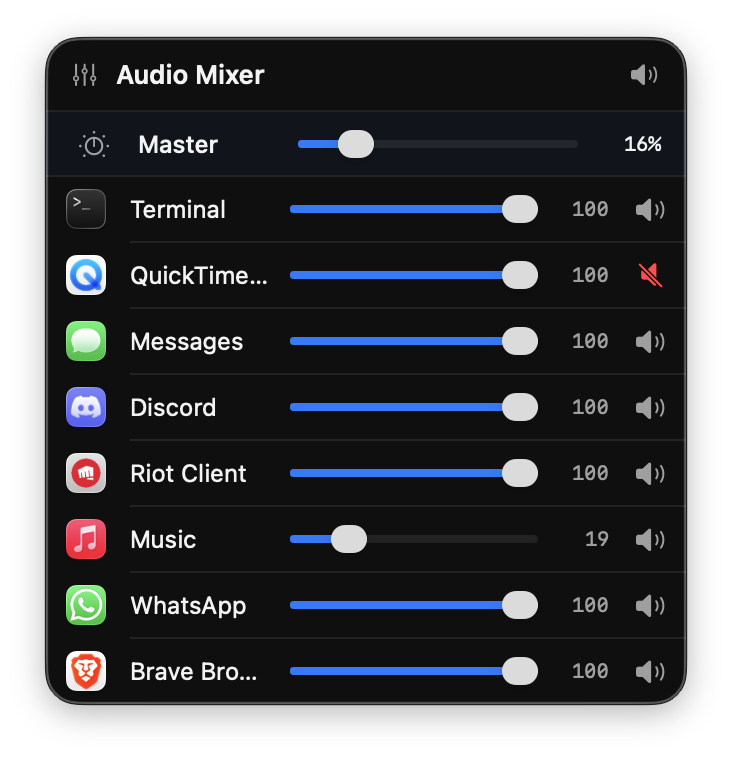
A native macOS menu bar app that does what Apple doesn't — individual volume sliders for every application.
The Problem
macOS has no built-in per-app volume control. Unlike Windows' Volume Mixer, there's no way to turn down Brave while keeping Music at full volume. Commercial solutions exist (SoundSource — $39) but use legacy kernel extensions or proprietary HAL plugins.
The Solution
Audio Mixer uses Apple's Core Audio Process Tap API (macOS 14.2+) — the same low-level system that powers screen recording audio capture — to intercept, mute, and re-route individual application audio streams with real-time gain control.
How It Works
- Process Discovery — Queries Core Audio's process object list and walks the process tree (via
sysctl) to group helper processes (like browser audio sandboxes) under their parent app - Audio Interception — Creates a
CATapDescriptionper process withmuteBehavior = .mutedWhenTapped, silencing the original audio in the system mix - Aggregate Device — Builds a private aggregate audio device that combines the tap input with the default output, using the tap's UUID for routing
- IO Proc Callback — Registers a real-time audio callback via
AudioDeviceCreateIOProcIDWithBlockthat copies tapped samples from input to output, multiplying by the per-app gain factor - Zero-latency — All gain is applied in the audio thread callback — no buffering, no AVAudioEngine, no AudioUnit overhead
Technical Challenges
- Tap UID discovery — Process taps don't expose a
kAudioDevicePropertyDeviceUID. The aggregate device references taps by the UUID assigned toCATapDescription, not by a HAL property query - Browser audio sandboxing — Chromium-based browsers (Brave, Chrome) route audio through sandboxed helper processes (
audio.mojom.AudioService) that have noNSRunningApplicationentry. Solved by walking the process tree viasysctlKERN_PROC to find the parent app - Perceptual volume scaling — Human hearing is logarithmic; linear gain multiplication sounds wrong. Applied perceptual curve mapping
Technical Stack
- Language: Swift 5, SwiftUI
- Audio: Core Audio HAL API (
AudioHardwareCreateProcessTap,AudioDeviceCreateIOProcIDWithBlock,AudioHardwareCreateAggregateDevice) - UI: SwiftUI
MenuBarExtrawith.windowstyle - Process Inspection:
sysctlKERN_PROC for parent process tree walking - Target: macOS 14.2+ (Sonoma)
Features
- Auto-discovers all audio-producing applications
- Per-app volume sliders (0–100) with real-time control
- Per-app mute and global mute-all
- Master volume control
- Groups browser helper processes under parent app
- Volume preferences persisted per bundle ID
- Menu bar-only app (no Dock icon)